
Organizations developing AI for edge devices often need flexibility across hardware platforms. This page walks through how NVIDIA-trained AI models can be ported to Qualcomm chipsets using ONNX and the Qualcomm AI Hub. You’ll learn the goals, implementation strategy, tools, and real-world business impact of this porting process.
1. Project Overview
Many edge devices – especially in industrial, automotive, and medical – remain on one chipset for stability and compliance. Still, teams increasingly want a portable path to hedge supply and cost risk.
When working with a partner like Qualcomm, our role is to make those choices viable by enabling cross-ecosystem deployment. In this specific instance, we collaborated to investigate and execute the porting of models originally trained on NVIDIA hardware to the Qualcomm chipset ecosystem.
2. Project Goals
Before starting the porting process, we defined clear objectives to measure technical feasibility, required resources, and expected performance benchmarks.
- Evaluate the technical feasibility of porting AI models trained on NVIDIA chipsets to Qualcomm chipsets
- Define required time and workload for the porting NVIDIA trained AI model to Qualcomm chipset
- Establish benchmarks of running models on Qualcomm chipset
3. Implementation Strategy
Our approach focused on proving a repeatable, chipset-agnostic workflow that could move models from NVIDIA to Qualcomm platforms efficiently.
We selected a representative path: take a model family used alongside NVIDIA Isaac GR00T (general-purpose robot foundation models) and retarget it from a CUDA/TensorRT workflow to Qualcomm using an ONNX-based toolchain. GR00T is one of NVIDIA's flagship Physical AI platforms, designed for robots that must perceive and act in the real world, making cross-chipset portability a practical concern for any team moving from lab to production.
While the overall approach is chipset-agnostic, we used the Qualcomm iQ8/iQ9 families, with QCS6490 as the concrete target, for validation. The plan was to demonstrate a repeatable, documentation-backed workflow that generalizes to Orin/TX-originated models and other Qualcomm targets.
4. Tools and Technologies
Successful porting required leveraging both NVIDIA’s development environment and Qualcomm’s AI Hub. The following stack formed the foundation of the workflow.
- NVIDIA CUDA and Isaac GR00T documentation for source-side assumptions and model export.
- Qualcomm AI Hub for ONNX ingestion, quantization, compilation to QNN, profiling, and remote execution.
This stack let us keep training/experimentation on the original platform and streamline deployment on the Qualcomm edge SoC.
5. Model Porting Process Overview
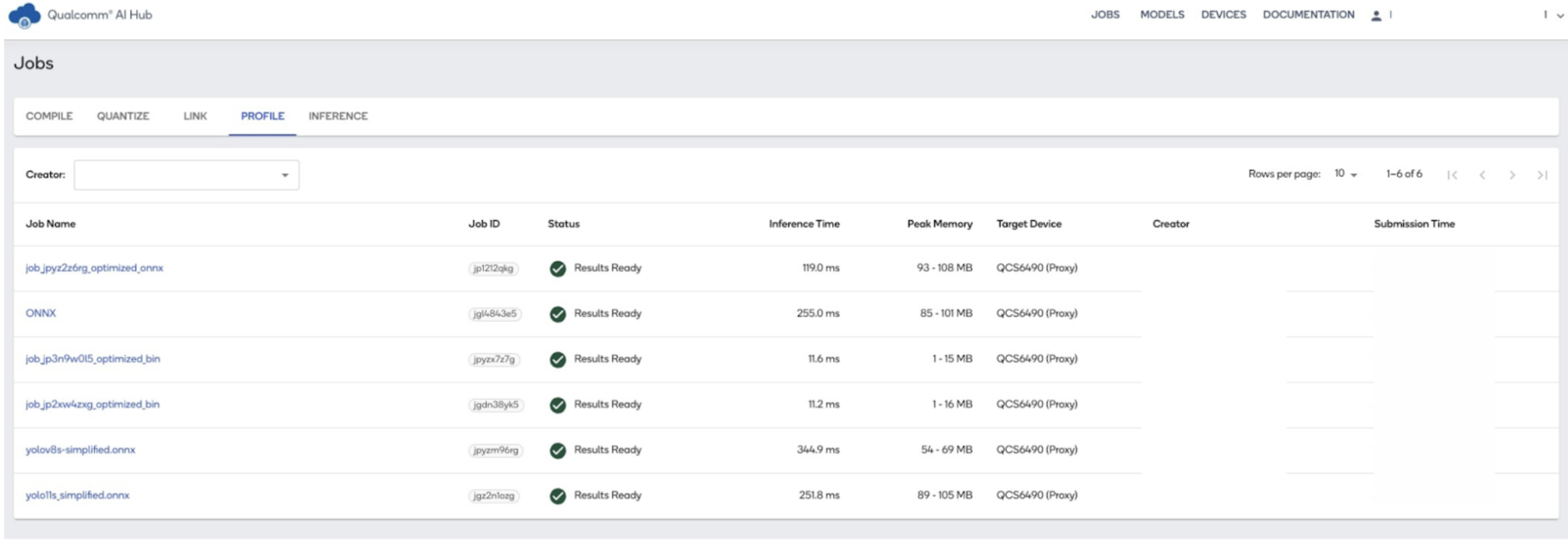
To make the process transparent, we documented each stage of the porting pipeline from setup to output visualization. Below is the step-by-step workflow. The porting of the YOLOv8 AI model from NVIDIA's platform to Qualcomm's QCS6490 chipset was executed using the Qualcomm AI Hub, an ONNX-compatible environment. Below is a detailed breakdown of the process, including installation guidance and key stages from model compilation to inference and output processing.
Installation and Setup
The Qualcomm AI Hub can be set up by following the official installation guide available here.
Qualcomm AI Hub Installation Guide
Step 1: Model Compilation
Script: 1_onnx_qnn_compile.py
The provided code is a Python script that performs several operations related to loading, checking, quantizing, and compiling an ONNX model using the qai_hub library.
The script checks the integrity of the loaded ONNX model using onnx.checker.check_model with full_check=True to ensure the model is valid
Next, a device object is created using qai_hub to specify the target device for quantization and compilation. In this case, the device is "QCS6490 (Proxy)"
The script prepares calibration data for quantization, which consists of a randomly generated image tensor with the shape (1, 3, 640, 640)
The quantized ONNX model is retrieved from the quantization job and asserted to be an instance of hub.Model
Finally, the script submits a compilation job to compile the quantized model to a QNN format. The compilation options specify the target runtime and quantization of input/output. The job's result is asserted to be an instance of hub.CompileJob.
Step 2: Profiling the Model
Script: 2_profile_model.py
The provided code is a Python script that interacts with the qai_hub library to profile a machine learning model.
The script retrieves a previously created profiling job using the job ID "jp0494l2g". This job ID is used to fetch the job details, including the model associated with the profiling job. The model is then stored in the variable hub_model.
Next, the script submits a new profiling job using the retrieved model. It specifies the target device for profiling as "QCS6490 (Proxy)". The hub.submit_profile_job function is used to submit this job, and the result is stored in the variable new_profile_job.
Step 3: Inference Execution
Script: 3_infer.py
The provided code is a Python script that performs inference on an image using a model from the qai_hub library. The script starts by importing necessary libraries, including numpy, PIL.Image, and qai_hub.
The script then loads an image named cap.jpg, resizes it to 640x640 pixels, and converts it to a NumPy array with a data type of float32.
To prepare the image for inference, it ensures the correct layout (NCHW) and rescales the pixel values to the range [0, 1]. This is done by transposing the array and expanding its dimensions.
An inference job is submitted using the retrieved model and the prepared input image. The hub.submit_inference_job function is used to submit this job, and the result is asserted to be an instance of hub.InferenceJob.
The script downloads the output data from the inference job and stores it in a dictionary. This dictionary contains the on-device output.
Finally, the script saves the result dictionary to a .npy file named inference_cap_yolo11s.npy.
Step 4: Output Processing & Visualization
Script: 4_process_output.py
The script processes the output of a YOLO model to extract and filter bounding boxes and class scores, applies NMS to remove redundant detections, and visualizes the final detections on the original image.
The compute_iou function calculates the Intersection over Union (IoU) between a given box and a set of boxes. This is used to measure the overlap between bounding boxes.
The nms_process function applies Non-Maximum Suppression (NMS) to filter out overlapping bounding boxes based on their IoU and confidence scores. It keeps the boxes with the highest scores and removes others that overlap significantly.
The script extracts bounding box predictions and class scores from the model output. It converts the bounding boxes from xywh to xyxy format and computes the maximum class scores and corresponding class IDs for each detection.
NMS is applied to the remaining detections to remove redundant bounding boxes.
The original image is loaded, and the bounding boxes are rescaled to match the original image dimensions. The script then draws the bounding boxes and class labels on the image.
6. Implementation Summary
Evaluation
- Reached parity with expected performance benchmarks for the selected small model class on QCS6490.
- Produced a validated, repeatable porting workflow anchored on Qualcomm AI Hub and ONNX.
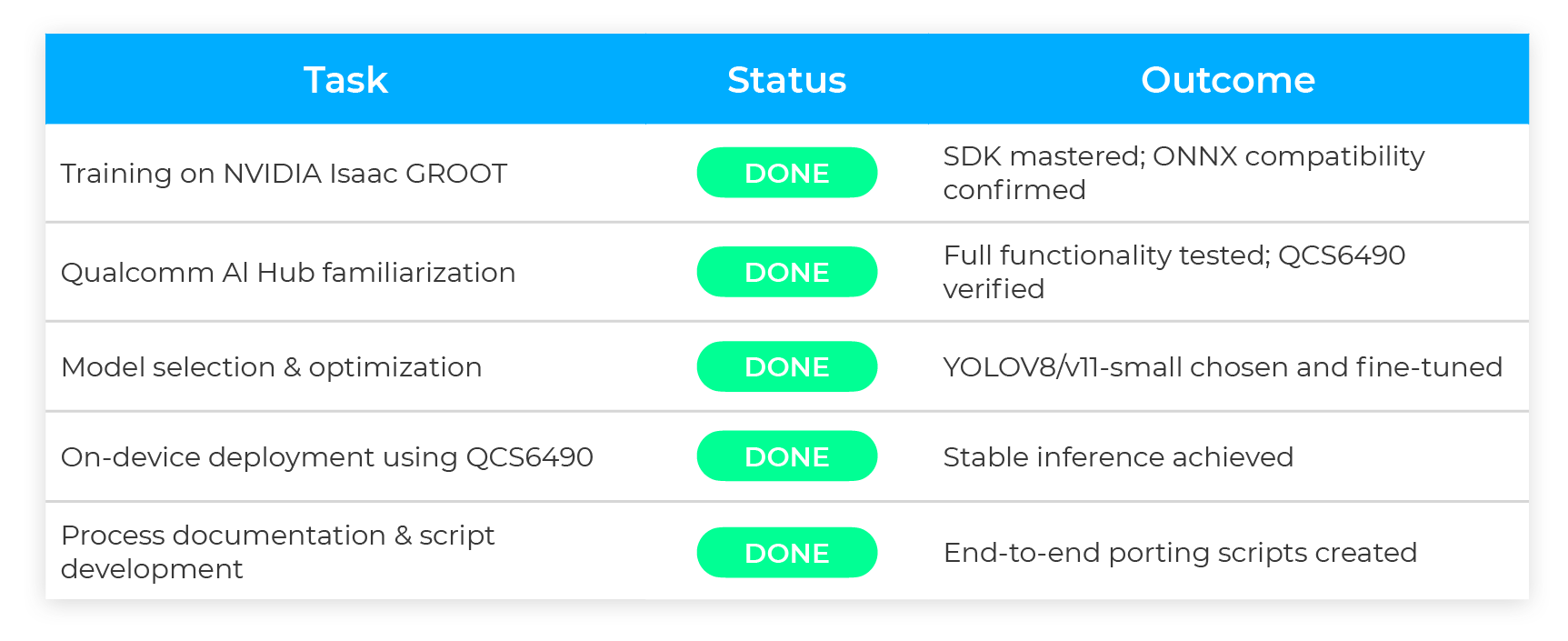
Total: 21 hours of ML engineer time to stand up the pipeline, validate on device, and produce artifacts.
7. Business Impact
- Platform flexibility without re-training: ONNX as the exchange format minimizes rework and preserves upstream investments.
- Faster time-to-market on the edge: A scripted, tool-based flow cuts bring-up friction when shifting from lab GPUs to fleet devices.
- Cost and power alignment: Teams can choose Qualcomm or NVIDIA per use case—guided by budget, thermals, and connectivity—without locking the model to a single vendor.
- Repeatability at scale: The same compile→profile→infer→analyze loop generalizes to new models and chipsets, streamlining future SKUs.
8. Lessons Learned
- The ONNX model format acts as a strong bridge between different hardware ecosystems.
- Qualcomm's QCS6490 provides a practical starting point for AI model deployment, although larger models may require higher-end platforms.
- A structured, tool-based approach ensures repeatability and reduces porting friction for future projects.
Porting AI models from NVIDIA to Qualcomm chipsets enables businesses to reduce vendor lock-in, optimize costs, and accelerate deployment. If you’re evaluating Qualcomm AI Hub or want to explore cross-chipset model deployment, our team can help guide the process.